Security Groups Introduction
Security Groups are a key feature in KarenCloud Services, acting as a virtual firewall to control inbound and outbound network traffic for virtual machines. By configuring security group rules, you can precisely define the types of traffic to allow or deny, protecting your virtual machine resources from unauthorized access.
What are Security Groups? 🤔
A Security Group is a virtual firewall mechanism that manages network traffic associated with virtual machine instances. Each security group contains a set of rules that control traffic access based on protocol, direction, action, and other parameters.
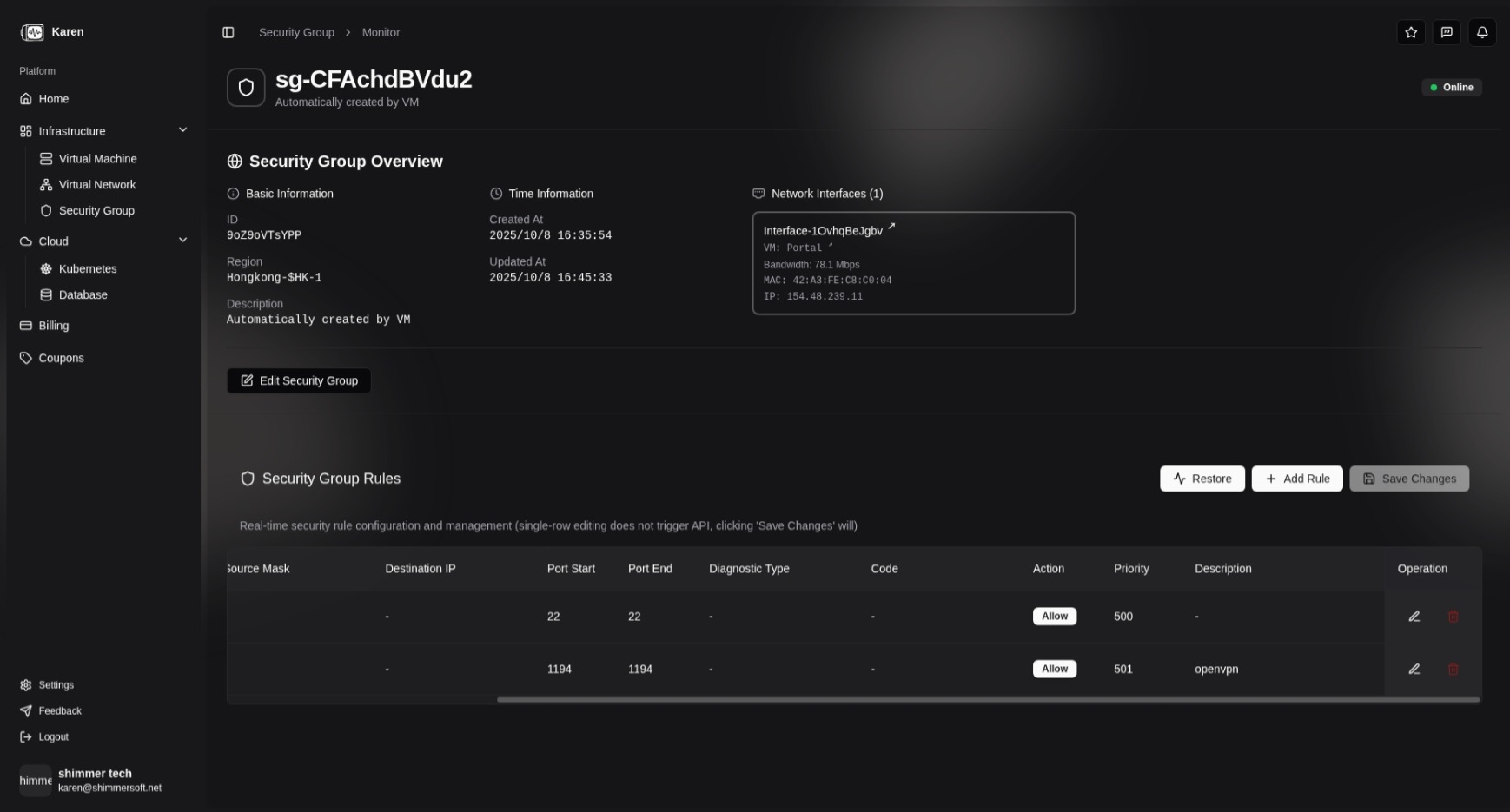
Creating and Managing Security Groups 🛠️
In the KarenCloud Service platform, you can configure security groups using the following steps:
-
Create a Security Group
- Log in to the Karen control panel and navigate to the "Security Groups" module.
- Click "Create Security Group," enter a name and description, then save.
-
Add Rules
- Select the target security group and click "Add Rule."
- Configure the protocol, direction, action, and additional parameters for the specific protocol (see details below).
-
Associate with Virtual Machines
- When creating a virtual machine, select the desired security group.
- For existing virtual machines, modify the associated security group through instance settings.
Security Group Rules Explained 📜
Each security group rule consists of the following main components:
-
Protocol: Specifies the protocol to which the rule applies. Supported options include:
- TCP: Transmission Control Protocol
- UDP: User Datagram Protocol
- SCTP: Stream Control Transmission Protocol
- IP: Internet Protocol (applies to all IP traffic, including TCP, UDP, ICMP, etc.)
- All: All protocols
-
Direction: Specifies whether the rule applies to inbound traffic ("In") or outbound traffic ("Out").
-
Action: Defines how matching traffic is handled. Options include:
- Accept: Allows the traffic to pass
- Drop: Denies the traffic
Depending on the selected protocol, additional configuration may be required:
TCP, UDP, SCTP Protocols
- Source IP Address (Optional): For inbound rules, specify the allowed source IP address; for outbound rules, this is typically not set (applies to all IPs of the virtual machine).
- Destination Port Range: Specify the allowed destination port range (start port and end port).
IP Protocol
- Source IP Address (Optional): For inbound rules, specify the allowed source IP address; for outbound rules, specify the virtual machine’s source IP address (typically not set).
- Destination IP Address (Optional): For inbound rules, specify the virtual machine’s destination IP address (typically not set); for outbound rules, specify the allowed destination IP address.
All Protocols
- No additional configuration is required; the rule applies to traffic of all protocols.
Rule Evaluation Mechanism 🔍
Security group rules are evaluated in the order they are defined, and the first matching rule determines the action (accept or deny) for the traffic. If no rule matches, the traffic is denied.
This allows you to create specific allow rules and add a final rule to deny all traffic, implementing a default-deny policy.
Related Documentation 📚
By understanding security group fundamentals, you can effectively protect your virtual machines from unauthorized access while ensuring necessary network connectivity. For practical examples and configuration guidelines, see the Best Practices guide.